Best PPM software 2027: Top 9 tools to drive innovation

.webp?width=1920&height=450&name=Top-10-project-portfolio-software-tech-and-development-teams-use-for-managing-innovation-projects-fullwidth%20(1).webp)
According to PMI's Pulse of the Profession 2026, nearly a third of complex projects never deliver their full intended benefits, more than double the failure rate of projects overall. For companies that run complex project portfolios, that is a direct hit to strategic objectives.
Strong project portfolio management (PPM) separates the two outcomes. The gap rarely comes from weak ideas. It comes from weak portfolio visibility. When teams cannot see how projects compete for the same people and budget, resource allocation turns into guesswork and strategic initiatives stall.
Project portfolio management software closes that gap. It gives portfolio managers one view of every project, live resource data, and a clear link between project execution and business strategy.
This guide covers what PPM software does, the key features that matter, and the top 9 project portfolio management tools for 2027. It is written for innovation teams who manage multiple projects and need each one to move the strategy forward.
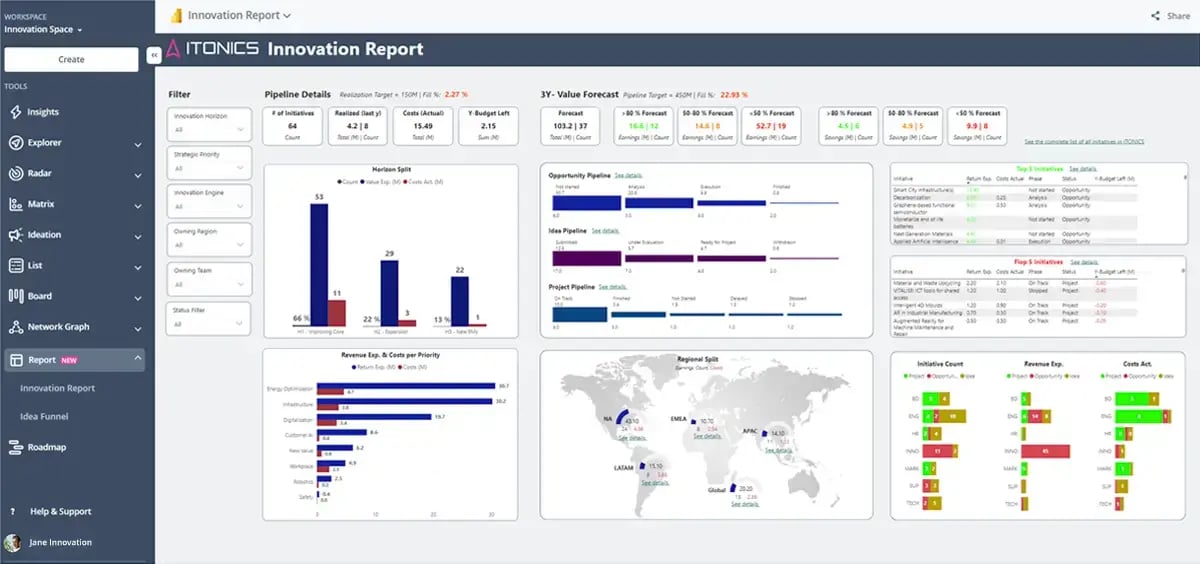
Exhibit 1: ITONICS project portfolio management software
Project portfolio management is the practice of overseeing multiple projects as one portfolio, so they align with strategic objectives, use resources well, and deliver business value.
Project portfolio management software is the system that runs that practice. It centralizes portfolio data, tracks project progress, and helps portfolio managers prioritize investments across the entire portfolio. Effective project portfolio management connects project planning, resource management, and strategy in one place.
Unlike single-project tools, PPM software takes a portfolio view. It coordinates work across teams and business units instead of managing one project in isolation.
A project portfolio holds many connected initiatives. A company investing in innovation might run separate projects for R&D, market analysis, product development, and commercialization. Project portfolio management ties them to one innovation roadmap and one set of business objectives.
Project management runs a single project. It tracks tasks, timelines, and delivery for that one effort.
Project portfolio management ranks and balances many projects at once. It decides which projects get funded, which get paused, and how resources move between them.
Put simply, project management asks "are we doing this project right?" Portfolio management asks "are we doing the right projects?" The best PPM software answers both, linking daily task management to portfolio-level decisions.
Project managers own delivery. They plan work, assign tasks, track progress, and keep one project on time and on budget.
Portfolio leaders own the mix. They set priorities across program and project portfolios, allocate resources, and mitigate project risks that threaten the wider strategy.
PPM software connects both roles. Project managers update project data at the work level. Portfolio leaders see it roll up into portfolio analysis and act on it. That shared view keeps project execution aligned with business strategy.
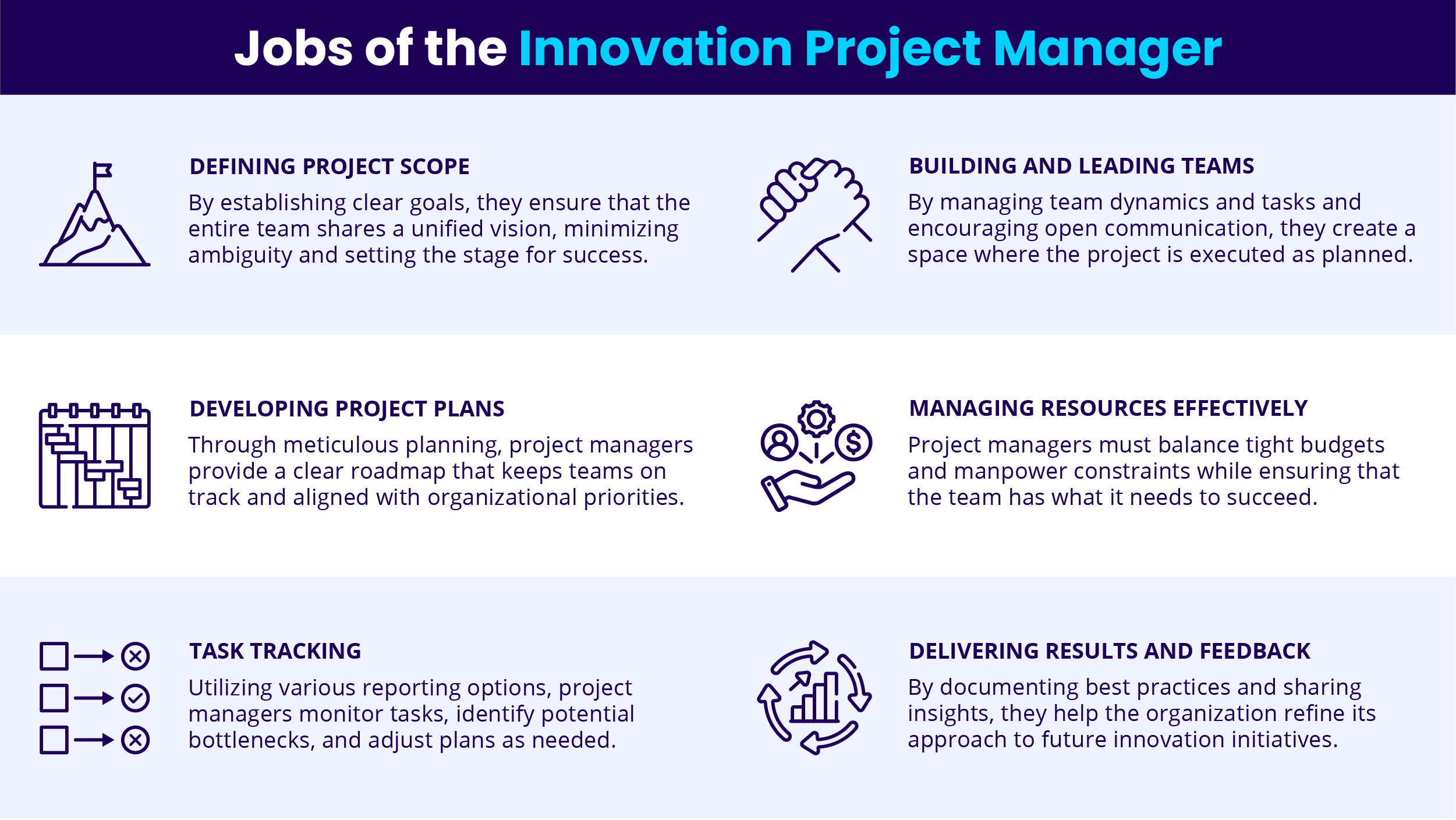
Exhibit 2: The jobs of the innovation project manager
Spreadsheets go stale, priorities blur, and resource constraints stay hidden until a project slips.
Project portfolio management (PPM) software helps organizations prioritize projects so the most critical initiatives get the resources they need. Here are the core benefits of using PPM software to manage project portfolios.
Innovation and new product development need strategic alignment, cross-team collaboration, and speed. The best project portfolio management software manages that complexity by adding visibility, coordination, and resource optimization.
PPM software supports innovation through structured idea management. Teams capture and score new ideas on feasibility and market impact, fund high-potential concepts, and track innovation projects inside the wider portfolio.
That turns scattered ideas into a managed pipeline. From there, project planning and resource management move each funded idea toward launch.
/Still%20images/Kanban%20Board%20Mockups%202025/Board-L-KPI-aggregation.webp?width=1600&height=1000&name=Board-L-KPI-aggregation.webp) Exhibit 3: Project boards as a pathway to turn ideas into scalable solutions
Exhibit 3: Project boards as a pathway to turn ideas into scalable solutions
Speed wins in product development. PPM tools drive faster time-to-market by streamlining workflows, tightening project planning, and reporting on project status and resource utilization in real time. Cross-functional teams accelerate ongoing projects and reduce project costs without losing accountability. With cleaner data and fewer bottlenecks, teams ship sooner and stay within budget.
The right project portfolio management (PPM) software keeps teams organized, aligns work with strategy, and optimizes resource allocation across program and project portfolios. These are the key features to weigh when you compare the best project portfolio management software.
Centralized dashboards give real-time project visibility. A high-level view of every project lets portfolio managers watch timelines, budgets, and resource usage in one place, which keeps project planning honest.
Look for customizable views to filter by project, team, or priority, plus real-time updates on project performance. That project visibility lets leaders catch risks early and align projects with business goals.
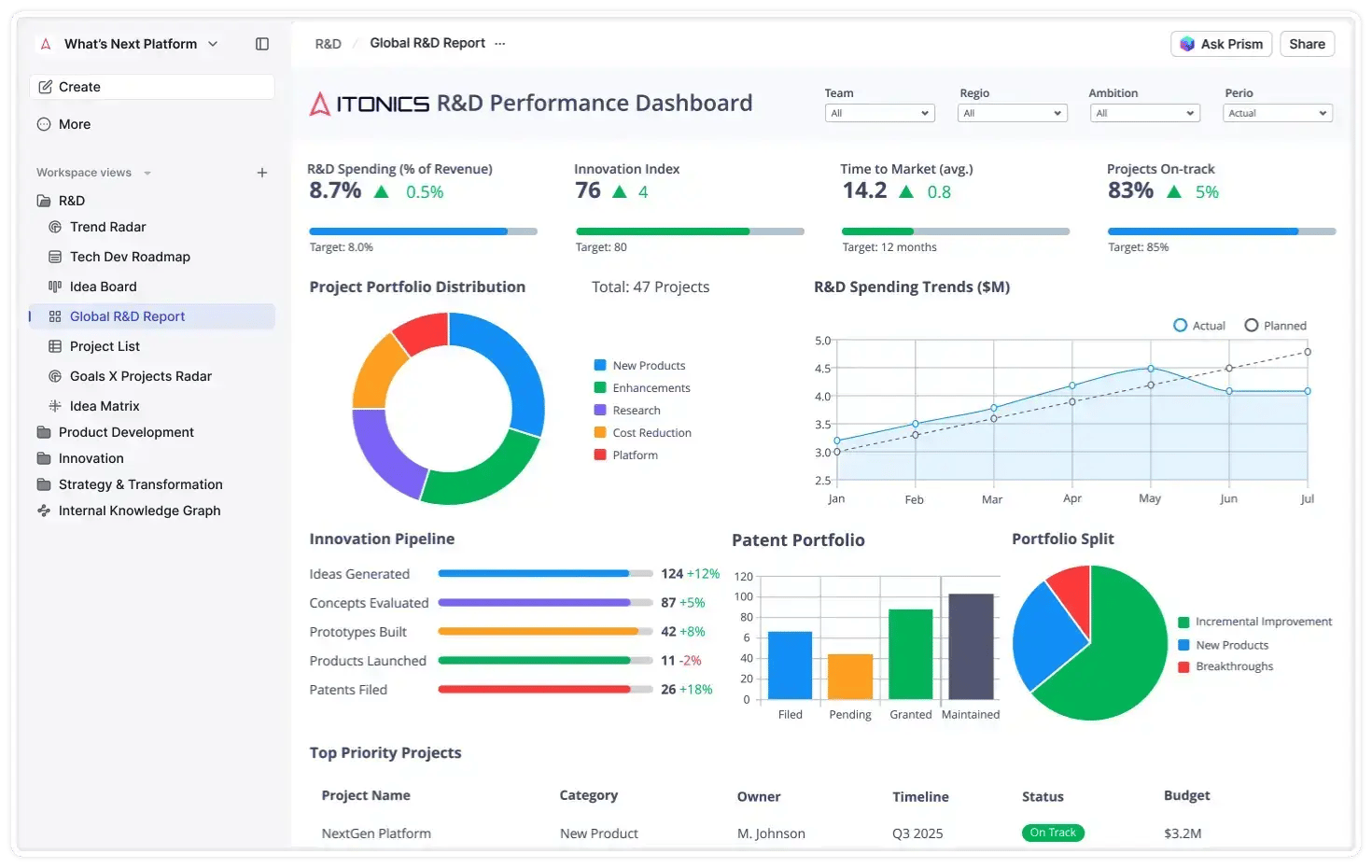 Exhibit 4: Centralized dashboards to track various projects
Advanced project management tools enhance task prioritization. Look for task dependencies that map relationships between projects, Gantt charts for timeline views, and Kanban boards for workflow tracking.
These advanced features separate capable project management software from basic to-do apps. They help teams manage project workloads and keep multiple projects aligned with strategic goals. These advanced features matter most when you manage project portfolios at scale.
Resource management optimizes workload distribution across projects, and protects delivery when priorities shift mid-quarter.
The best tools track team availability, automate resource allocation to prevent burnout, and add budget tools for financial management and financial planning. With live resource visibility, organizations optimize resource allocation and drive resource optimization across the portfolio, lifting resource utilization without burning teams out.
/Still%20images/Roadmap%20Mockups%202025/portfolio-visualize-critical-paths-2025.webp?width=1440&height=900&name=portfolio-visualize-critical-paths-2025.webp)
Exhibit 5: Strategic roadmap for resource management and allocation
Every project portfolio faces risk, from budget overruns to slipped milestones. Portfolio-level risk management stops one project's slip from cascading across the plan.
Look for issue tracking, automated alerts for emerging risks, and scenario planning to model outcomes before you commit. Proactive risk management keeps strategic initiatives on track.
Artificial intelligence is reshaping how portfolios are run. Predictive analytics sharpen decisions and surface problems early.
AI-driven predictive analytics helps organizations forecast project outcomes and resource demand before commitments are locked. AI predicts project delays, identifies high-impact projects, and automates risk assessment.
Real-time monitoring and AI-driven forecasting improve risk mitigation across the portfolio. AI-powered insights also sharpen project prioritization and resource allocation, which is where most portfolios leak value.
One caution. Gartner surveyed 782 infrastructure and operations leaders in late 2025 and found only 28% of AI use cases fully met ROI expectations, while 20% failed outright. The lesson carries over to project management: AI enhances decision-making in project portfolio management only when it is governed, integrated, and tied to a business goal.
/Still%20images/AI%20Mockups%202025/Grid-L-Optimize-the-portfolio.webp?width=1600&height=1000&name=Grid-L-Optimize-the-portfolio.webp)
Exhibit 6: AI in project portfolio management software
Generic tools stop at task management. The best software links idea management to the portfolio, so promising concepts get funded and tracked, not lost.
This is where comprehensive project portfolio management separates from basic project management software. It manages the full path from idea to launch, not just the tasks in between.
Your PPM tool should connect to the systems you already run. Look for ERP links for financial management, CRM for customer data, and innovation platforms for the R&D pipeline. Strong financial management integration keeps budgets and financial planning in step with delivery. Clean integration with existing tools keeps portfolio data consistent.
Security is non-negotiable. Role-based access, data encryption, and audit logs protect sensitive project data and keep the platform compliant.
These project portfolio management tools differ most in how they handle innovation, resource management, and financial management. General project management tools cover tasks. Portfolio management tools connect those tasks to strategy. Each option below lists key features, pros, and cons.
ITONICS is the leading platform for innovation portfolio management, built to connect trend scouting, ideation, and project execution in one system. It is designed for organizations that run innovation as a portfolio and need each initiative tied to strategy.
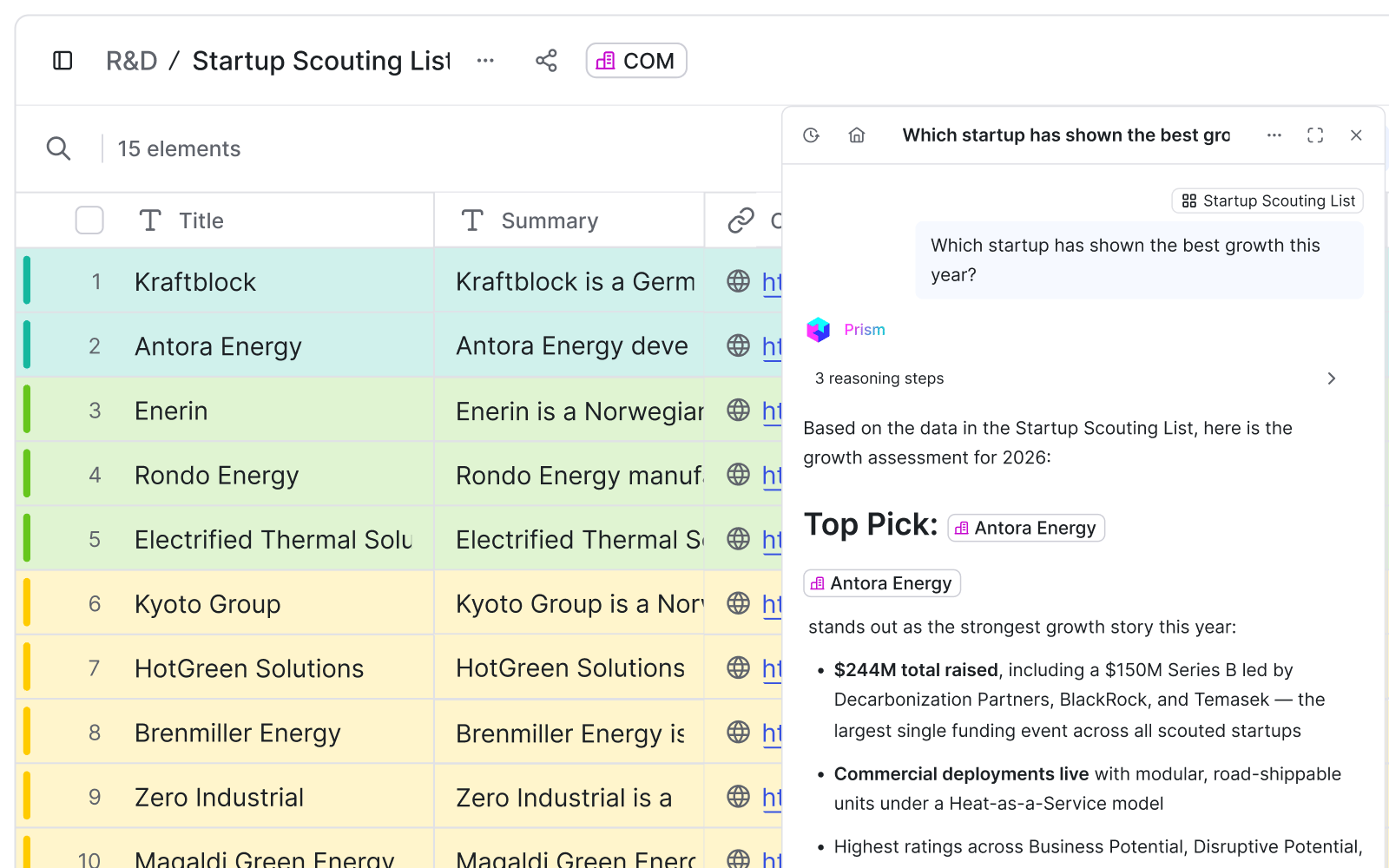
Asana is popular project management software for task tracking and team coordination. It suits teams that want a clean, simple way to stay aligned.
Planview focuses on enterprise portfolio and program management, with AI-powered forecasting, scenario planning, and governance tools. It fits businesses managing long-term strategic initiatives.
Monday.com is a flexible work platform with customizable workflows for teams of all sizes. It helps teams streamline processes and collaborate.
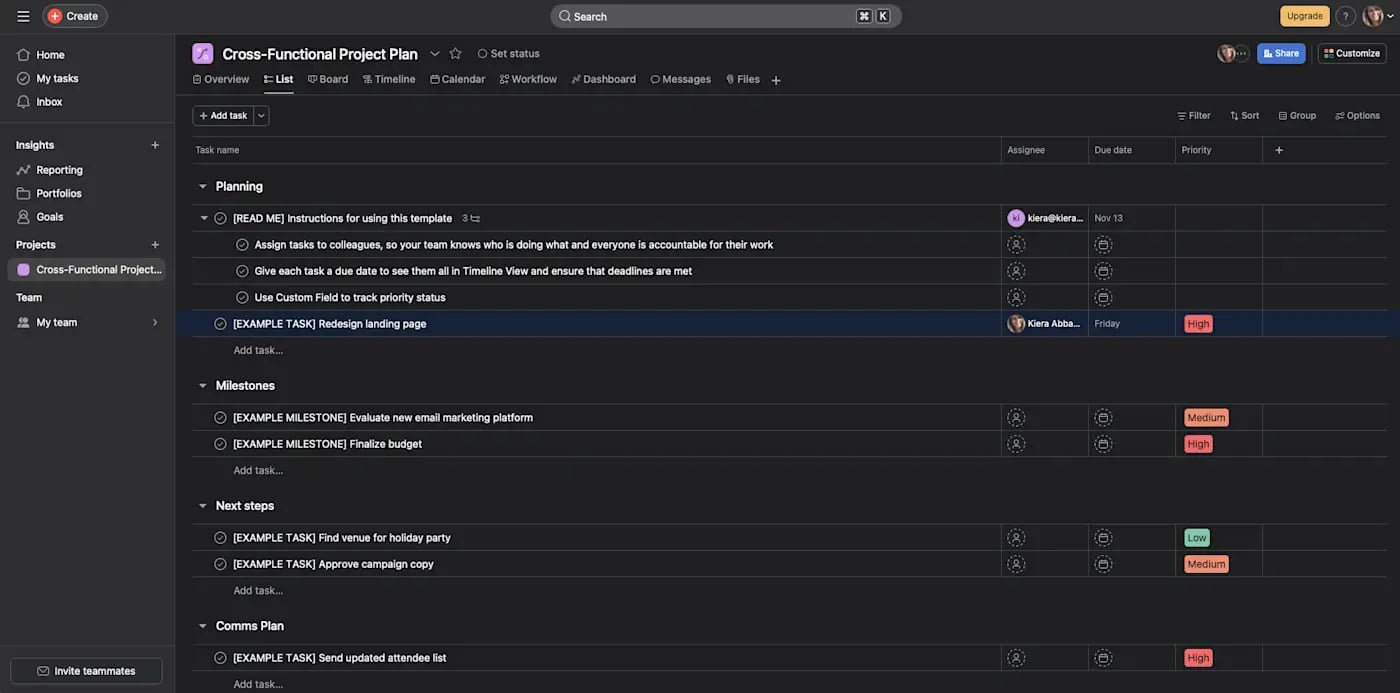
Jira is a common choice for software teams running agile project management. Its sprint planning and issue tracking make it a fit for technical and enterprise teams.
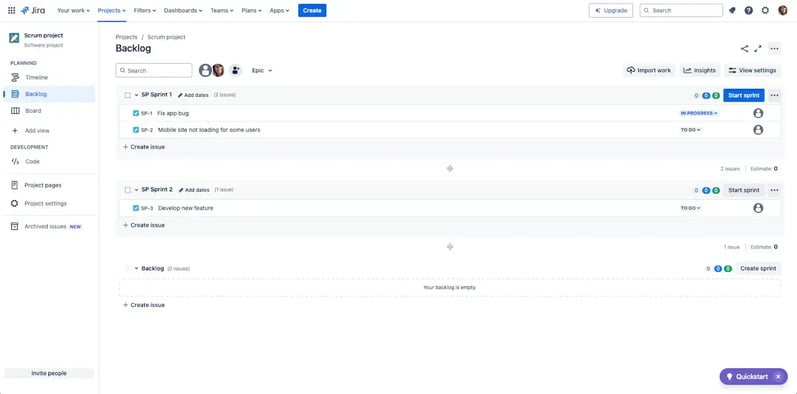
ClickUp combines task management, docs, and collaboration in one workspace. It suits teams juggling diverse workflows.
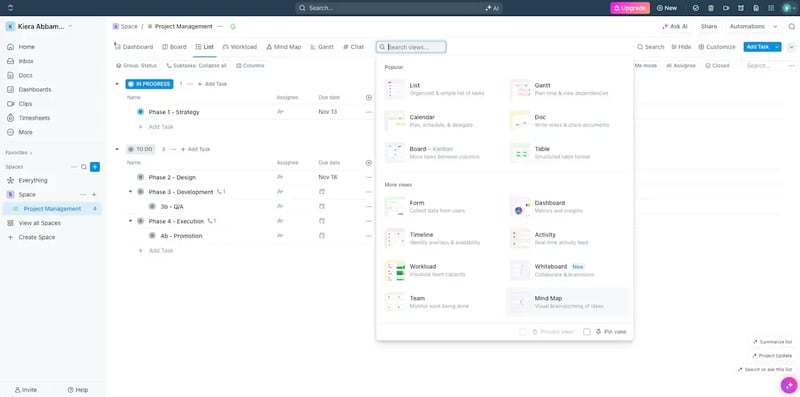
Microsoft Project is a detailed project and program management tool with Gantt charts, timeline tracking, and resource allocation. It integrates with Microsoft 365, so it fits Microsoft-heavy enterprises.
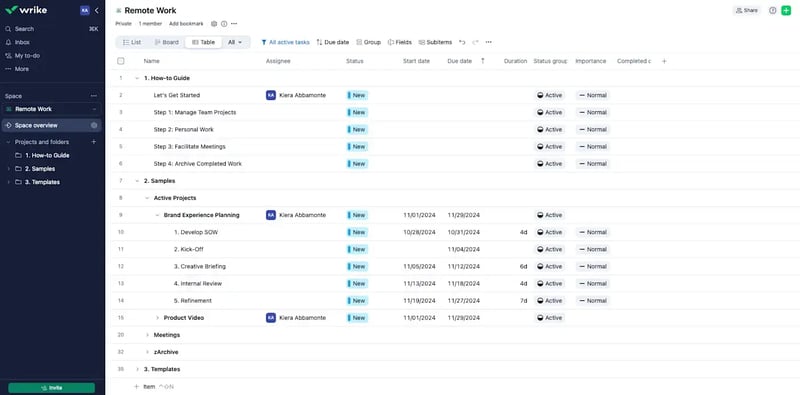
Wrike is a project management tool for enterprises and creative teams. It offers time tracking, visual proofing, and real-time updates.
Smartsheet blends a spreadsheet interface with project management. It suits spreadsheet-savvy teams that need automation and collaboration at scale.
Use this quick comparison to match a tool to your portfolio type before you book demos.
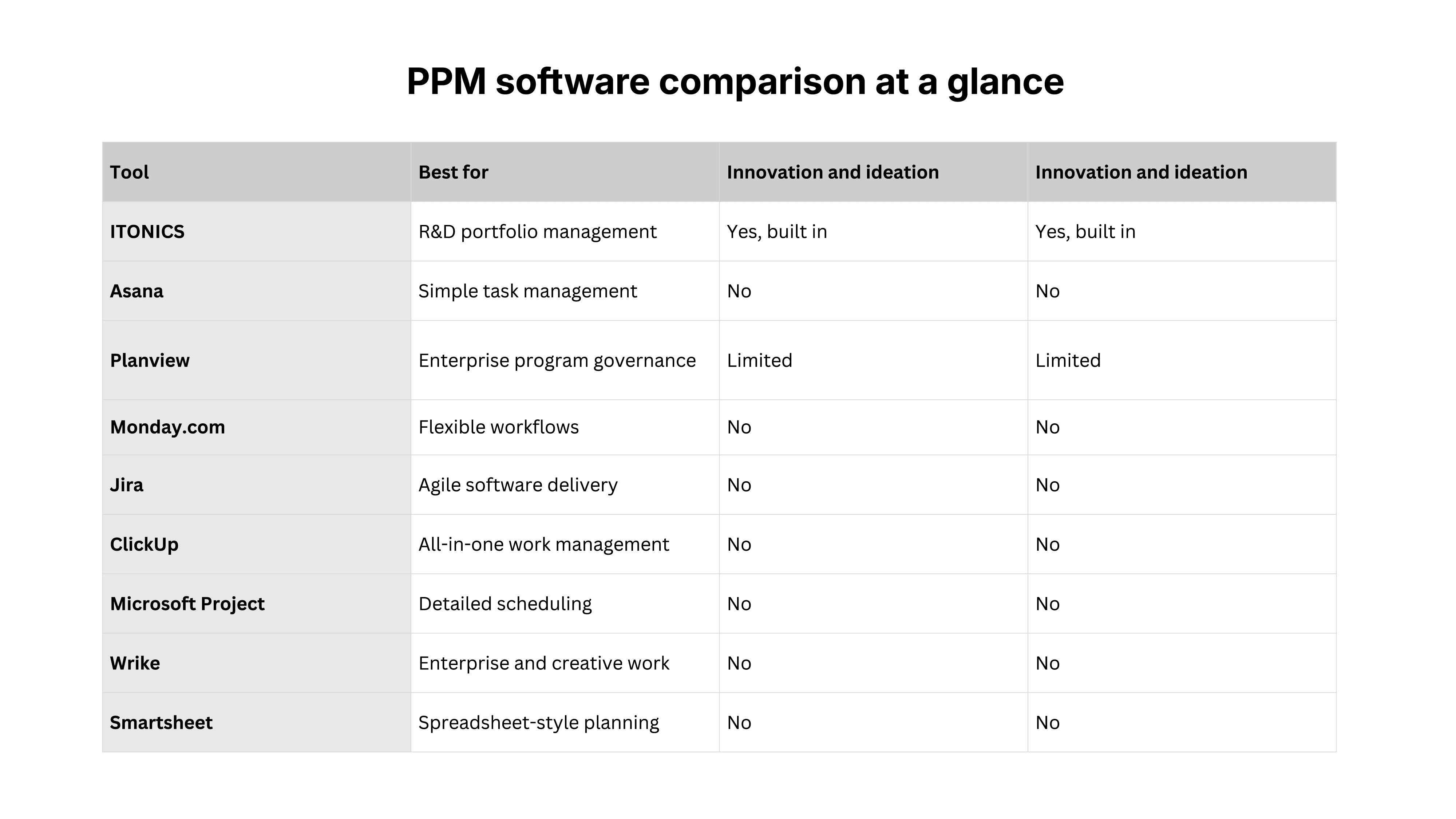
Exhibit 7: PPM software comparison at a glance, showing how the nine tools stack up on innovation and ideation support
Buying project portfolio management (PPM) software is one decision. Getting value from it is another. A structured rollout drives adoption, cleaner workflows, and successful project delivery.
Define objectives and requirements before selecting PPM software. Buying first and scoping later is the most common reason a rollout stalls.
Start with the problem. Decide whether you most need clearer portfolio oversight, faster decisions, or better resource allocation, then match the tool to that gap.
Then list your requirements: automation, integration with current tools, scalability, and real-time reporting. Tie the choice to strategic portfolio management goals so the platform serves your strategy and wider project planning, not just task tracking.
Not every tool handles innovation. Many stop at task management and never touch idea-to-launch work.
Score each option on innovation fit, resource allocation, risk management, scenario planning, and demand management. Good demand management shows which requests deserve capacity before you commit. Weight the features that match how your teams actually manage multiple projects and run project prioritization, then rank the tools against that list.
Even strong software fails without adoption. A short rollout plan and clear project planning up front decide whether teams use the tool or route around it. Secure leadership and team buy-in early, and show how the tool cuts manual work and improves project prioritization.
Get leadership buy-in early. Adoption stalls without it, and executive sponsorship turns a tool purchase into a working process. Train teams with hands-on sessions and ongoing support.
Customization is essential for aligning PPM software with how your organization actually works. Configure dashboards, workflows, and user roles to fit existing governance, instead of reshaping the business around a default template.
Integrate PPM software with existing business tools, including CRM, ERP, and financial management systems, so information flows across departments and financial planning stays accurate.
Then monitor performance continuously. Run regular portfolio analysis on adoption, project completion rates, and resource utilization, so teams can effectively manage the portfolio as it grows.
By 2027, project portfolio management software is evolving into more intelligent and integrated platforms. Three shifts matter most.
AI is shifting from a passive feature to core resource management in PPM software. AI-powered automation is expected to handle workflows, capacity planning, and complex data analysis, not just surface suggestions.
The key advancements are AI-driven insights and dynamic resource optimization, which minimizes idle time and anticipates bottlenecks before they hit a schedule. Continuous prioritization lets organizations optimize resources and reallocate them as market conditions shift, instead of waiting for the next quarterly review. Capacity planning becomes continuous rather than quarterly.
Leaders can now simulate different investment and staffing scenarios before they commit budget. Real-time simulations help Project Management Offices validate investment choices securely, using live project data instead of a stale spreadsheet.
Hybrid management approaches are becoming common, raising agility and responsiveness. Integrated platforms now support multiple methodologies, including Agile and Waterfall, within a single portfolio, so teams adapt the method to the work.
Low-code customization enables organizations to adapt governance processes without extensive development, so the tool fits the process instead of the reverse.
ITONICS is the modular platform for portfolio optimization. It helps R&D and innovation teams to manage complex projects, drive innovation, and align teams with strategic goals.
Stay on top of project spending and progress. Turn opportunities and strategic initiatives into projects with clear timelines, build roadmaps, and track performance against project milestones and financial management targets with real-time dashboards.
Secure leadership trust with data-driven insights. Centralized reporting gives executives one source of truth for strategic planning, resource distribution, and portfolio performance. Clear strategic alignment and live portfolio performance data support portfolio optimization and smarter demand management.
Reduce operational friction. ITONICS tracks dependencies, automates workflows, and helps teams optimize resources, so they accelerate innovation cycles and execute with speed.
Book a demo to see how ITONICS runs innovation management end to end.