
Ask Prism how fast a topic is moving, based on recent patents, research, and news, and save the result in a rating property. To learn more, see Overview of Prism and Rating properties.
Before you start
The element type needs a rating property for the speed of change, and you need permission to edit elements of that type.
Note: Some element types also have the rating properties Speed of Change [90 Days] and Speed of Change [180 Days]. ITONICS fills them itself from the growth of patents, news, and publications on the topic, so Prism can't set them.
Auto-rate speed of change
Open the element, and click the Prism button in the bottom-right corner.
Prism adds the element as context.
Ask Prism to rate the speed of change, and press Enter.
For example: Rate the speed of change for this element based on recent patents, research, and news. Prism searches patents, publications, and other web sources, and explains its rating with the developments it found.
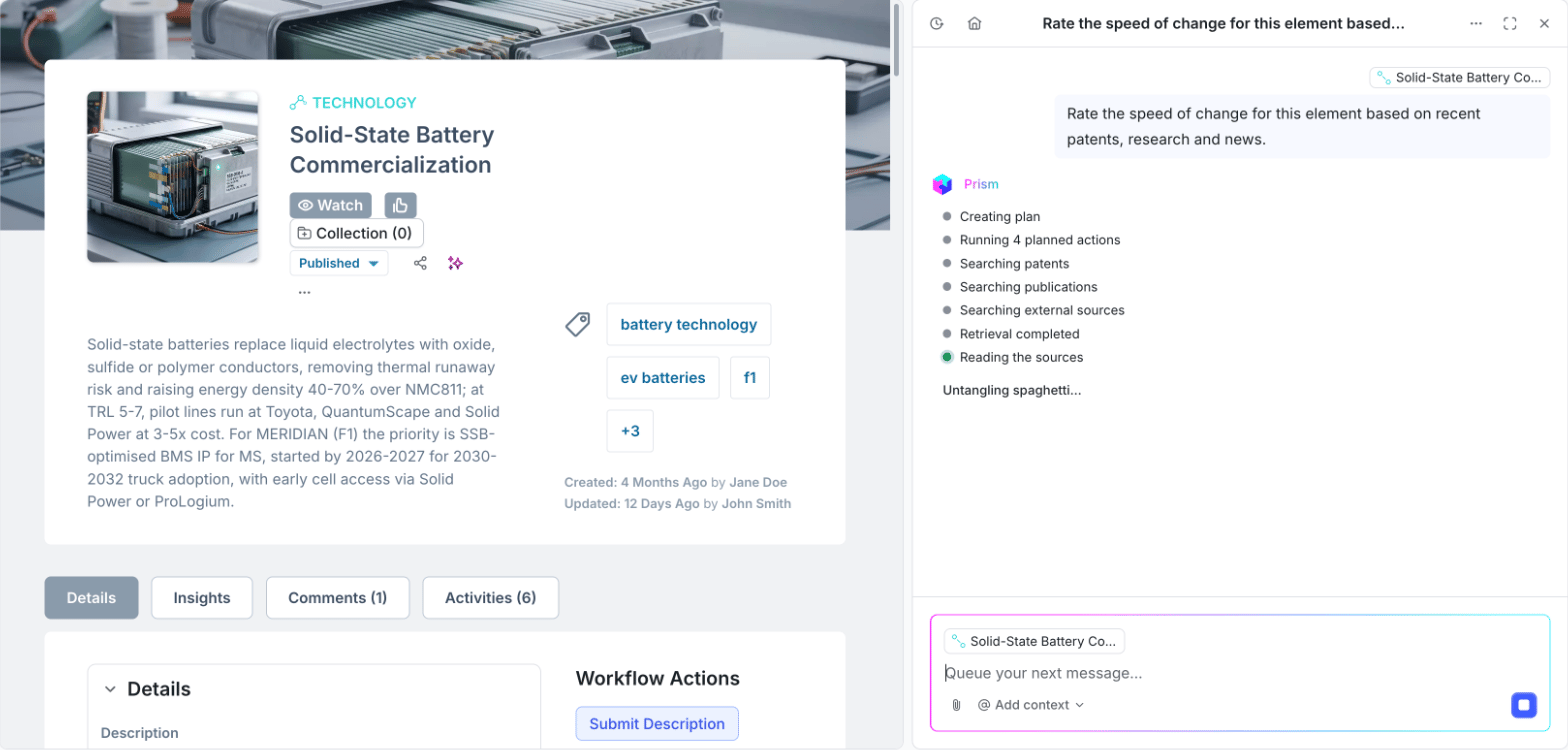
Ask Prism to propose a value for your speed of change property.
Name the property, for example: Propose Speed of change based on what you found. Prism shows a card with the proposed rating.
Check the rating, and click Accept.
Prism's rating is a judgment call based on the sources it found, often a small sample. For ratings that drive important decisions, let your experts check them.
Result
The element shows Prism's speed of change rating. To rate elements with your team, see Rate elements.