
Create activity types and milestone types to organize roadmaps by color and, for milestones, by icon. To learn how types show on a roadmap, see Overview of roadmaps.
Before you start
By default, Workspace Admins and Moderators can edit activity and milestone types. Types apply to all roadmaps of the workspace.
Create an activity or milestone type
From the roadmap legend
Open a roadmap and click the Legend icon in the toolbar on the right.
In the legend, click the gear icon of the activity types or the milestone types.
The type settings open, with an Activity Type tab and a Milestone Type tab that list the existing types.
Point to Create in the bottom-right corner, and click Create Activity Type or Create Milestone Type.
Under Title, enter a name, and optionally a description.
Under Color, select a color. For a milestone type, also select an icon under Icon.
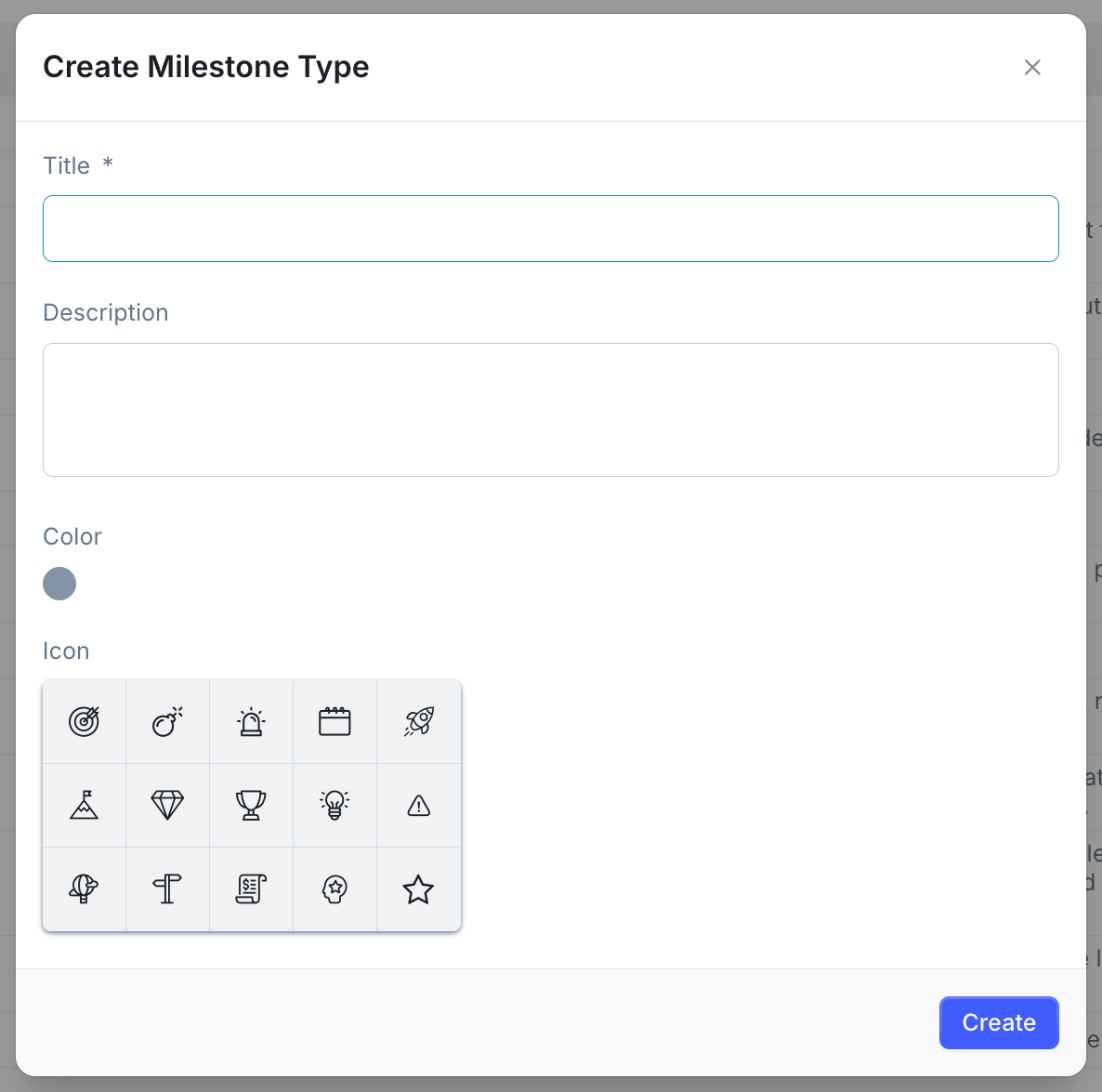
Click Create.
While you edit an activity or milestone
On the roadmap, click the activity or milestone.
In the panel that opens, open the Activity Type or Milestone Type list and select Create at the bottom.
Fill in the type as described above, and create it.
In the type settings, you can view the existing types and edit the ones your workspace created. ITONICS provides default activity and milestone types, such as Research or Key Decision Point. You can't edit or delete the default types.
Result
The new type appears in the type settings, in the legend of roadmaps that use it, and in the type lists of activities or milestones.