
Create a view that shows the elements you need in the form that fits, and change, duplicate, or delete it later. To learn what views are, see Understanding views and folders.
Create a view
In the sidebar, click the plus icon at the top of the workspace navigation.
Select View, then a view type: Table, Board, Grid, Radar, Matrix, or Network graph.
To create the view inside a folder, use the plus icon next to the folder instead.
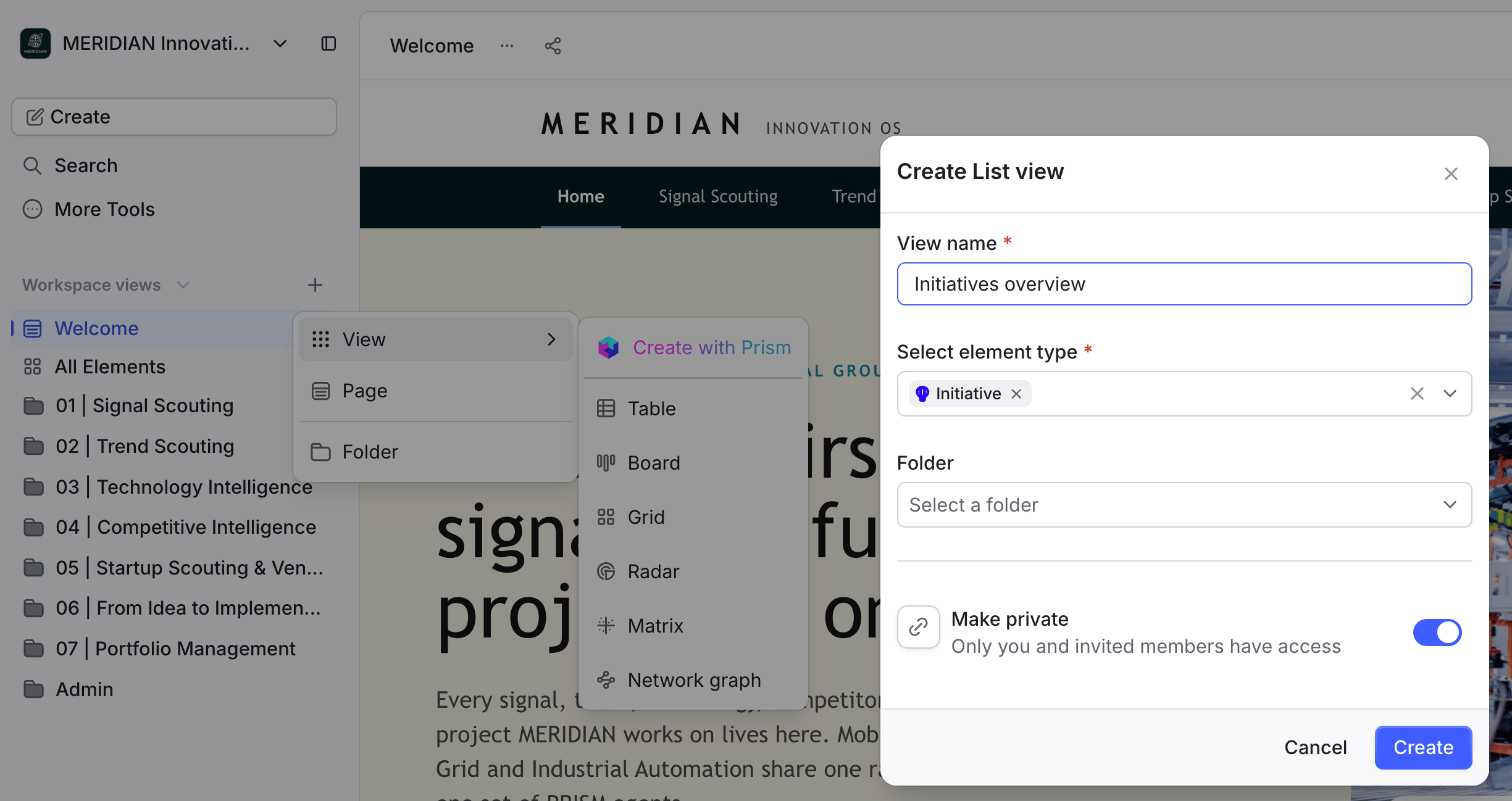
Under View name, enter a name.
Under Select element type, select one or more element types.
The view shows elements of these types.
Optional: Under Folder, select the folder the view goes in.
Turn off Make private if everyone in the workspace should see the view.
A private view is visible only to you and the members you invite.
Click Create.
The view opens, and you can set up its filters, columns, grouping, and sorting.
To have Prism pick the view type and set it up from a description, see Create views with Prism.
When you change how a view looks, click Save changes at the top right to keep the changes in the view, or Reset to discard them.
To manage a view, point to it in the sidebar and click the more icon next to it:
| Action | What it does |
|---|---|
| Copy link | Copies a link to the view. |
| Open in New Tab | Opens the view in a new browser tab. |
| Add to favorites | Adds the view under Favorites at the top of the sidebar. Favorites are personal: only you see yours. To take the view out again, select Remove from favorites. |
| View settings | Changes the view's name, its folder, and whether it's private. The element types of a view can't be changed afterward. |
| Export view as Excel | Emails you a link to an Excel file with the elements of the view. The link works for 7 days. In board views, this is under Export..., next to Export view as PDF, which also sends the file by email. |
| Duplicate view | Creates a private copy named "Copy of" plus the view name, at the end of the workspace views. The copy has its own filters: changing them doesn't change the original. |
| Duplicate as | Creates the same private copy as another view type: table, board, grid, radar, matrix, or network graph. To switch a view to another type, duplicate it this way, then make the original private rather than deleting it, because deleting breaks links to it. |
| Delete view | Deletes the view. The elements it shows aren't affected. You can't undo this. |