
Routing nodes decide which path or paths an element takes through a workflow. They check the element's property values at the moment the element reaches them, and send it on accordingly. To learn how nodes fit into a workflow, see Overview of workflows.
Types of routing nodes
| Node | Paths that run | Use it when |
|---|---|---|
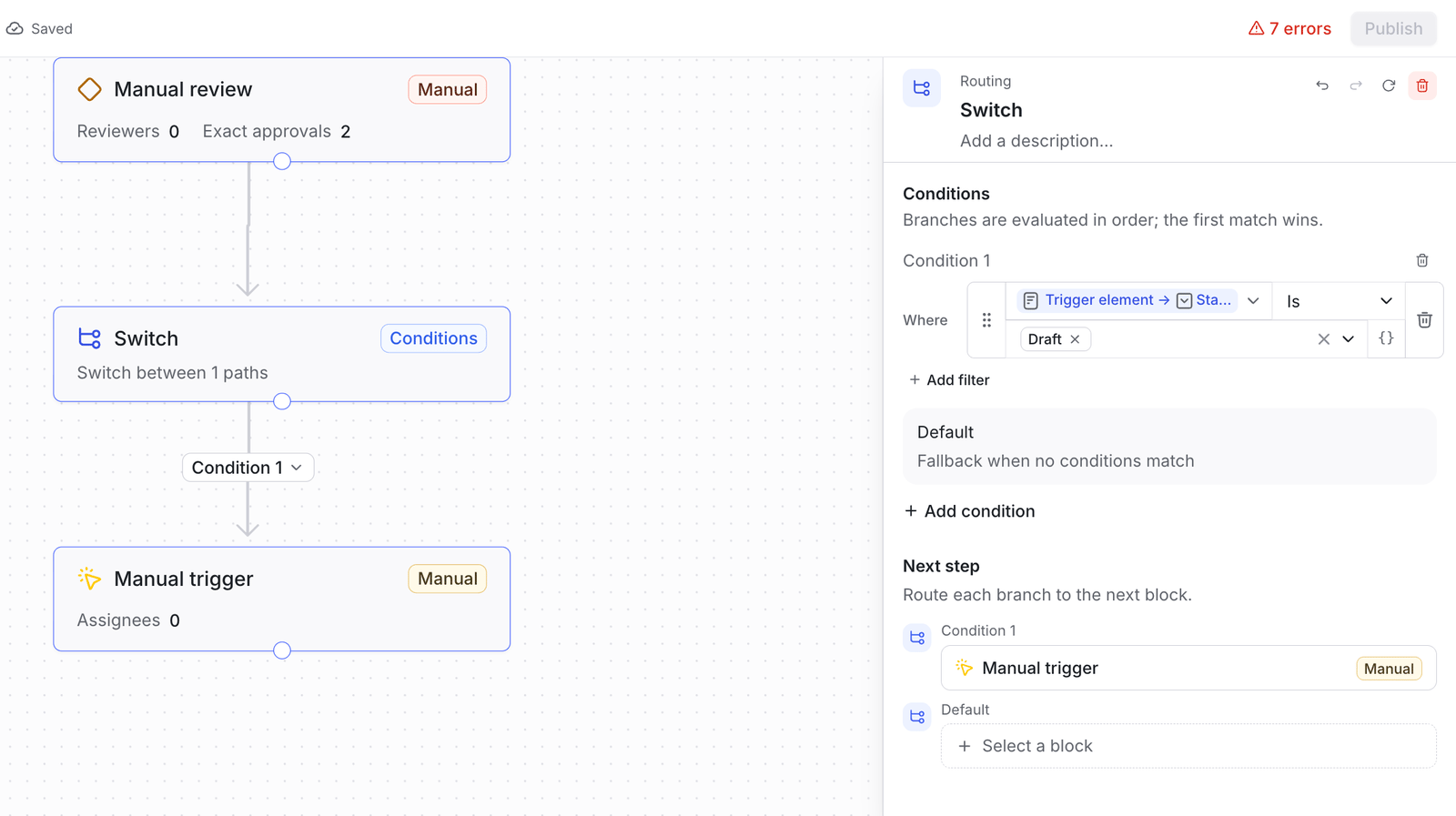
| Switch | Exactly one. The branches are checked in order, and the first branch whose condition matches wins. If none matches, the element takes the default branch. If the default branch has no next block, this part of the workflow ends. | An element must go one way or another, for example a different review per department. |
| Conditional run | Every path whose condition matches, so several paths can run at the same time. If no condition matches, this part of the workflow ends for the element. | Some steps apply only to some elements, and several can apply at once. |
| Parallel run | All paths, at the same time. A parallel run needs at least 2 paths. | Several teams work at once, for example one form each for engineering, finance, and product. |
| Filter | One path, and only if the element meets the filter's criteria. Otherwise the workflow stops at the filter. | Later steps should only run for some elements, for example only if the budget is over 10,000. |
Conditions
Switches, conditional runs, and filters check conditions. A condition is one or more filters, each with a property, an operator, and a value, for example Status is Draft. You can combine several filters with AND or OR.
A filter can check a property of the element or a result of an earlier node, such as the response status of an HTTP request. The property list groups the values under Trigger element and under each earlier node that produces a result. The value to compare against can also come from the workflow context: click {} next to the value field. See Workflow context.
A switch and a conditional run have one condition per path, and you can add more paths. On a switch, the default branch has no condition: it's the fallback when no other condition matches. A conditional run has no default path. If every element must continue, make sure one of its conditions always matches, or use a switch instead.
When conditions are checked
A routing node checks its conditions once, when the element reaches it, with the values the element has at that moment. If a condition reads a property that's still empty, it can't match:
- Switch: the element takes the default branch, or this part of the workflow ends if the default has no next block.
- Conditional run: no path matches, and this part of the workflow ends.
- Filter: the criteria aren't met, and the workflow stops.
The workflow doesn't come back to the node when someone fills in the property later. For ways to make sure a value exists before a routing node checks it, see Workflow best practices.
One workflow instead of several
Because routing nodes read the element's properties, one workflow can cover cases that would otherwise each need their own. For example, a switch on a Department property can send each department down its own path, with its own form and its own reviewers. You then maintain one workflow instead of one per department.