Best technology scouting software for enterprise R&D in 2026


For enterprise R&D teams, the best technology scouting tool is the one that gets scouted technologies into portfolio decisions. ITONICS scores highest at 4.7 out of 5 and links scouting to projects, roadmaps, and stage gates. Traction Technology and Cypris follow at 4.0, Traction for startup pilots and Cypris for AI research agents. Patsnap scores 3.7 and fits patent-led work. The practical setup is one portfolio system with integrated scouting capabilities or integration options with specialist tools.
Patsnap, Cypris, AlphaSense, and Wellspring Scout each advertise 400 million or more searchable records, documents, or data points. Data is plentiful. Attention at the portfolio review is scarce, because linking a signal to the project that gets money next quarter still takes manual work.
| Tool | Score | Best for | Core strength |
| ITONICS | 4.7 / 5 | R&D teams that run scouting and the project portfolio in one system | Radar, Roadmap, and Workflow link scouted technologies to portfolio and gate decisions |
| Traction Technology | 4.0 / 5 | Startup and vendor pilots at enterprise scale | Scouting, evaluation, pilots, and portfolio reporting in one platform, from $4,000 per seat per year |
| Cypris | 4.0 / 5 | AI research agents along the stage-gate process | Agents across 198M+ patent documents, scientific data, and 1M+ news sources |
| Patsnap | 3.7 / 5 | Patent-led technology landscapes and IP decisions | AI patent search, monitoring, and IP analytics on a 2B+ dataset |
Exhibit 1: Top four technology scouting tools by indicative score
This review scores 10 tools on how well they move a signal into that decision, using six weighted requirements.
Scouting pays for itself the moment a project changes course because of something the scouts found. Until then, reports and a technology radar sit on the cost side of the ledger.
Most of the return comes from four kinds of decisions:
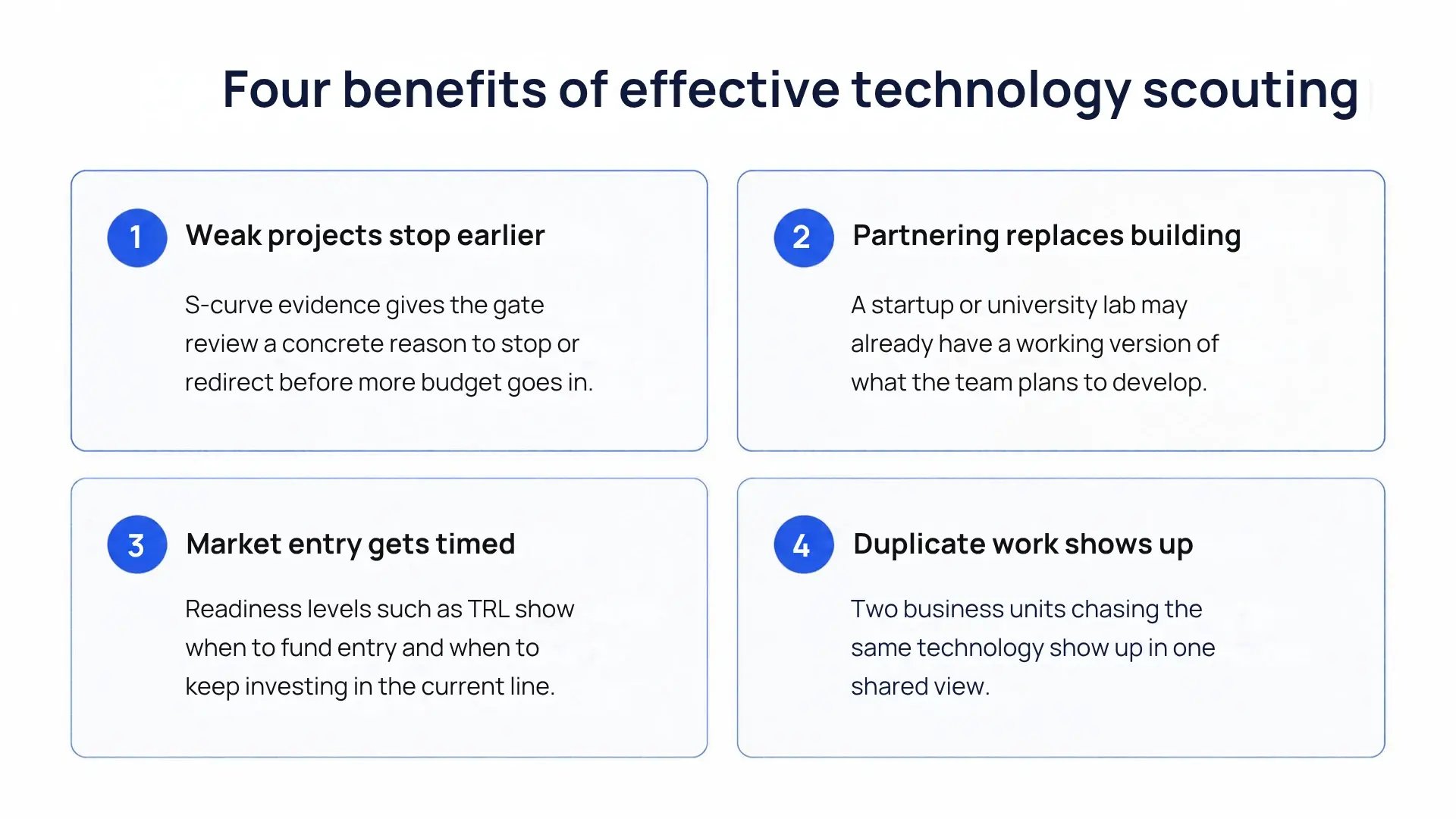 Exhibit 2: Four benefits of effective technology scouting
To know whether you have an efficient technology scouting organisation, run three checks. All three use material the team already has.
A small first number, a large second number, or any overlap in the third check is enough to justify a software evaluation.
Digital technology scouting tools earn their place when reducing manual effort in finding and routing signals. The six requirements below describe what buyers need to look for when evaluating their toolset.
Excel spreadsheets are the most common tool used. In a review of 2,193 ITONICS calls from 2024 and 2025, buyers named Excel as their current alternative in one call in five (19.8%). Task management software came up in 9.3% of calls and SharePoint in 6.4%. The most frequently named innovation software vendor trailed at 3.3%.
The spreadsheet route costs time first. Reporting and executive visibility came up in more than half of the calls (53.5%), and the routine behind it is familiar to anyone in a portfolio office. Before every steering committee, someone copies the latest entries into slides by hand. Dräxlmaier put a figure on it. After moving its pre-development workflows into ITONICS, the company cut manual project reporting effort by 70%.
It also costs accuracy. A spreadsheet is correct on the day someone last edited it. Patents, papers, and startup news keep arriving, and the file catches up only at the next quarterly review.
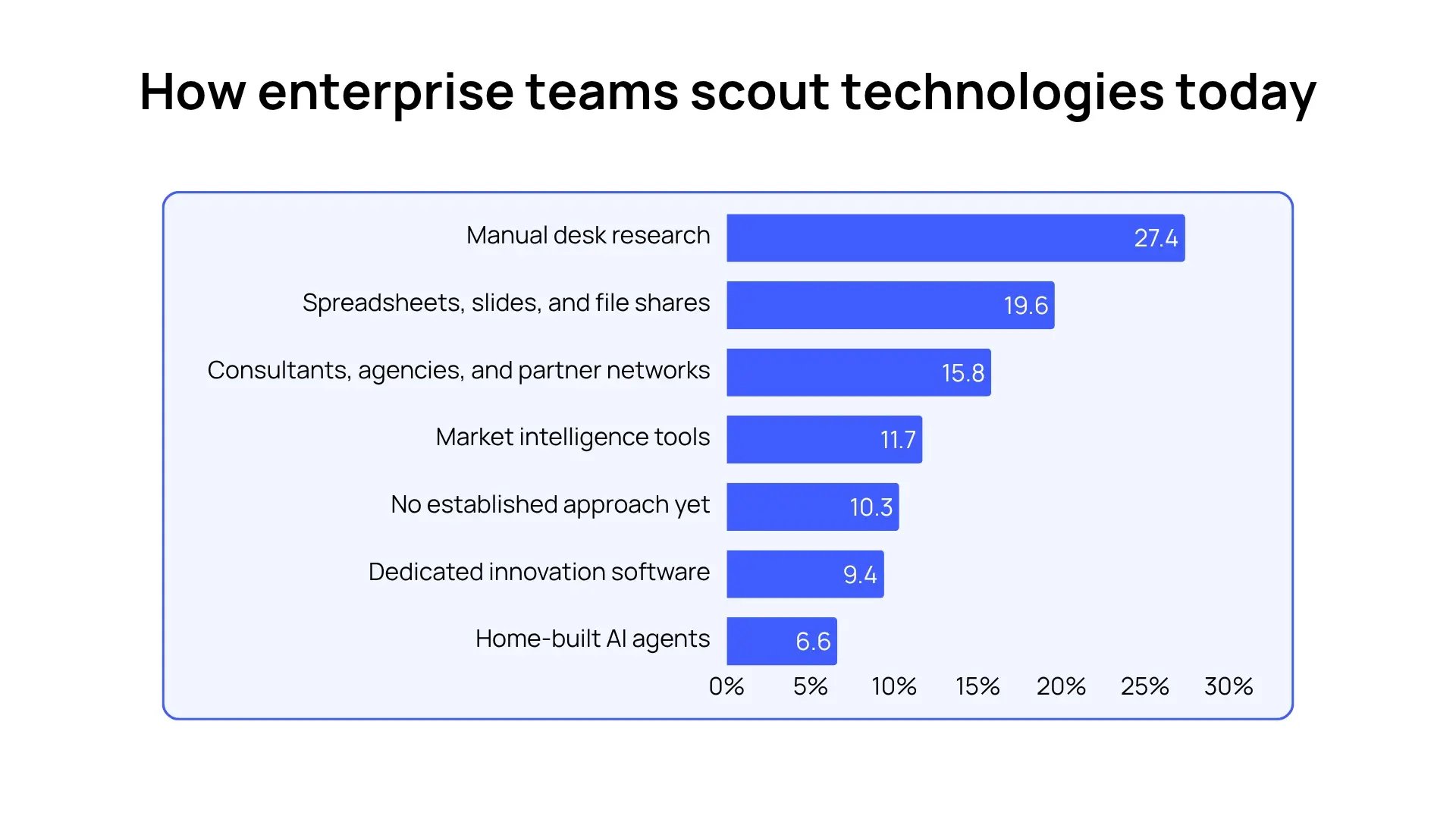 Exhibit 3: Most common tools used in technology scouting
Portfolio connection and automatic updates carry 45% of the score because they decide whether scouting reaches a portfolio decision. Source coverage gets 15%. The large data vendors each index hundreds of millions of records, and at that scale, what happens after the search counts for more than the size of the index.
|
Requirement |
Weight |
Why it matters |
Demo test |
|---|---|---|---|
|
Link to the portfolio |
25% |
Scouting results reach the gate review |
Link a scouted technology to a live project and move it through a gate in the same platform |
|
Automatic updates |
20% |
The view stays current between quarterly reviews |
Ask to see last month's changes in one search field, collected automatically |
|
Source coverage |
15% |
Patents, papers, startups, and news sit in one place |
Run one search field across all four source types and check coverage of Chinese patents and papers |
|
AI with human review |
15% |
AI sorts and summarizes, people decide |
Give the AI a short strategy brief, let it rate five technologies, then correct one rating |
|
Access for the wider organization |
15% |
Engineers and business units add what they know |
Ask for the price of 50 read-only users and how those users comment and rate |
|
Openness |
10% |
Results reach Teams, Excel, PowerPoint, and AI assistants |
Import an existing Excel list, export one slide, and request the API and MCP documentation |
|
Security |
Pass or fail |
IT signs off before purchase |
Request SOC 2 and ISO 27001 certificates, SSO details, and a written answer on data hosting and AI training |
Exhibit 4: 7 scoring criteria to evaluate technology scouting tools
Run the security check before anything else. Then score each remaining tool from 1 to 5 per requirement, multiply by the weight, and add the results. The two highest scorers go into a trial on the team's own data.
Download the technology scouting tool comparison sheet
The tools fall into three groups. ITONICS, Traction Technology, and Wellspring Scout connect the signal to what happens after a find, from evaluation to the gate decision. Cypris, Patsnap, AlphaSense, StartUs Insights, and Orbit Intelligence specialize in the finds. Spreadsheets and homegrown AI assistants are the do-it-yourself route.
Each tool carries an indicative score out of 5, weighted by the six requirements in the previous chapter. A requirement scores 5 when the vendor's website documents it, 3 when coverage is partial or needs a separate product, and 1 when it sits outside the documented scope.
The eight vendor tools are ranked by that score, and the two do-it-yourself routes follow as a baseline. Scores reflect public documentation in October 2026, so a demo can move them in either direction.
Indicative score: 4.7 / 5 (portfolio 5, updates 5, sources 3, AI 5, access 5, openness 5)
Best for: R&D teams that run scouting and the project portfolio in one system.
ITONICS stores technologies, trends, startups, and projects as linked records. The radar plots them by any property, and the workflow moves a technology through phases and gates. Prism, the built-in AI, scouts the web and a curated signal pool, drafts evaluations, and flags projects to stop, scale, or start.
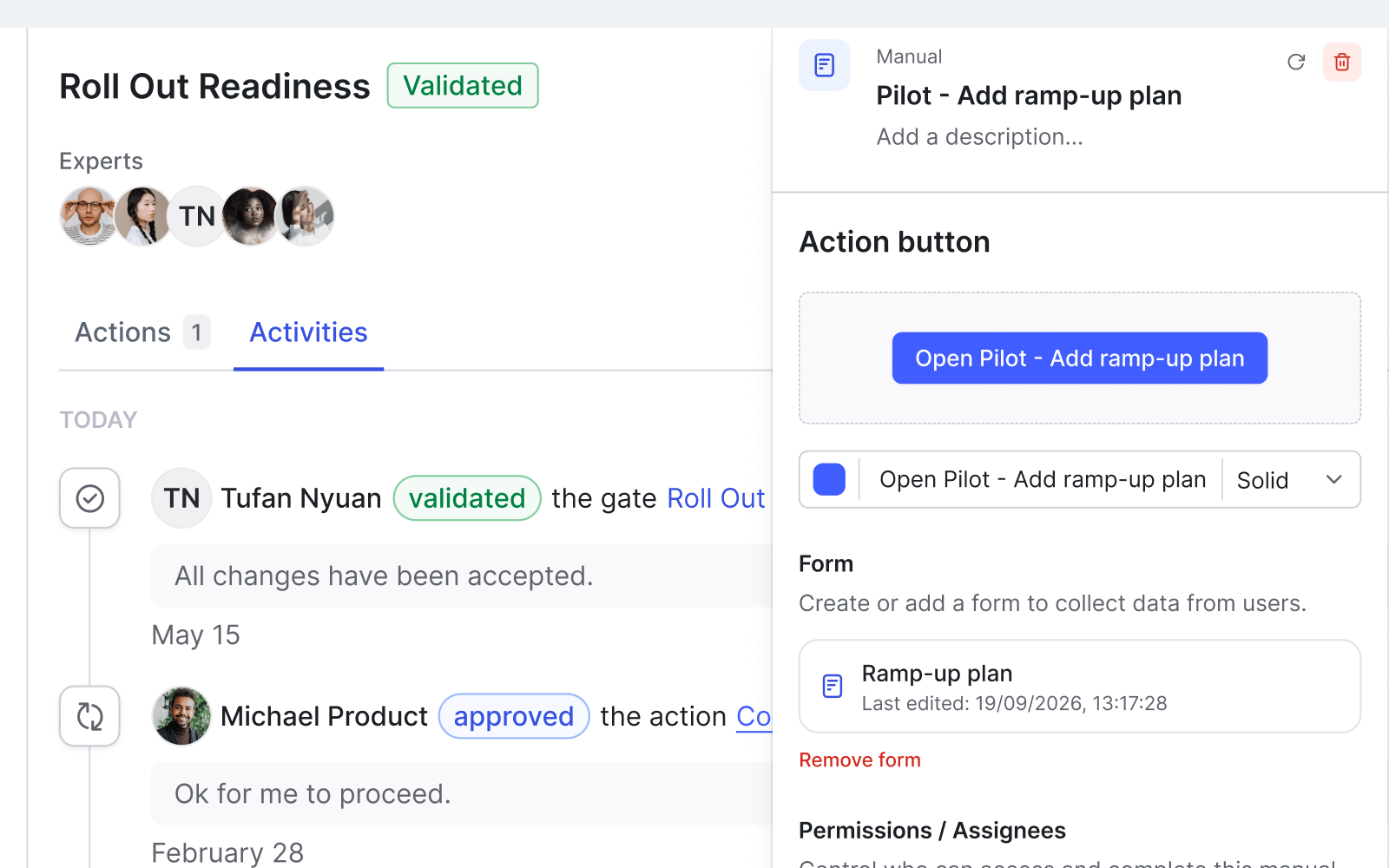
Exhibit 5: A workflow step with assigned owners inside ITONICS
Pros
Cons
Pricing: Three tiers by team size and complexity, free guided tour.
Security: SOC 2, ISO 27001, SSO, full audit trail.
Indicative score: 4.0 / 5 (portfolio 5, updates 3, sources 1, AI 5, access 5, openness 5)
Best for: Innovation teams that run startup and vendor pilots at enterprise scale.
Traction runs idea capture, technology scouting, evaluation, pilots, and portfolio reporting in one innovation management platform. Traction AI researches companies and narrows a large pool to a shortlist. Gartner listed Traction in its February 2026 Market Guide for AI-Enabled Innovation Management Platforms.
Pros
Cons
Pricing: $4,000 per Standard seat per year. Enterprise plans add custom workflows, integrations, and data migration.
Security: SOC 2 Type II, SSO/SAML.
Indicative score: 4.0 / 5 (portfolio 3, updates 5, sources 5, AI 5, access 3, openness 3)
Best for: R&D and IP teams that want AI research agents along the stage-gate process.
Cypris runs AI agents for technology scouting, literature review, prior art, competitive intelligence, and white space analysis. The agents draw on more than 198 million patent documents from over 150 countries, scientific and regulatory data, and more than 1 million news sources, and they monitor changes continuously.
Pros
Cons
Pricing: Free trial, then through sales.
Security: SOC 2 Type II, tenant isolation, end-to-end encryption.
Indicative score: 3.7 / 5 (portfolio 1, updates 5, sources 5, AI 5, access 3, openness 5)
Best for: Patent-led technology landscapes and IP decisions.
Patsnap combines patent search, drafting, monitoring, and IP analytics on a dataset of more than 2 billion entries. The data spans patents, scientific literature, litigation, and chemical information. Task-specific agents handle novelty, freedom-to-operate, and competitor analysis.
Pros
Cons
Pricing: 14-day free trial.
Security: SOC 2 Type 1.
Indicative score: 3.2 / 5 (portfolio 1, updates 5, sources 3, AI 5, access 3, openness 3)
Best for: Market, competitor, and company research.
AlphaSense indexes more than 500 million documents, including company filings, broker research, expert call transcripts, news, and regulatory sources. Generative AI answers carry sentence-level citations, and an always-on agent monitors product launches and strategy moves.
Pros
Cons
Pricing: Annual subscriptions, per seat or enterprise-wide.
Security: Enterprise-grade data protection stated. Request certificates.
Indicative score: 2.7 / 5 (portfolio 3, updates 1, sources 5, AI 3, access 3, openness 1)
Best for: Sourcing technologies and partners from patents, publications, and research grants.
Scout searches more than 400 million records, including patents, research publications, scientific grants, and startups. Its analytics show which technology areas are maturing and which researchers and institutions lead a field.
Pros
Cons
Pricing: Through Wellspring's sales team.
Security: Request documentation.
Indicative score: 2.5 / 5 (portfolio 3, updates 1, sources 3, AI 3, access 1, openness 5)
Best for: Startup and emerging technology discovery.
StartUs Insights covers more than 9 million startups and scaleups and over 20,000 technologies. The platform links companies, technologies, investors, and market trends, with project management features on top.
Pros
Cons
Pricing: Free trial, then through sales.
Security: Request documentation.
Indicative score: 2.5 / 5 (portfolio 1, updates 3, sources 3, AI 3, access 3, openness 3)
Best for: IP teams that need deep patent search and legal status analysis.
Orbit Intelligence is Questel's patent search and analytics software. It adds AI-based patent classification, legal status analysis, and search across chemical structures and DNA and amino acid sequences.
Pros
Cons
Pricing: Through Questel's sales team.
Security: Request documentation.
Do-it-yourself options
Indicative score: 2.5 / 5 (portfolio 3, updates 1, sources 1, AI 1, access 5, openness 5)
Best for: Small programs with one scout and a short technology list.
A scout researches each technology, types it into Excel, scores it by hand, and turns the list into slides before each review.
Pros
Cons
Pricing: Existing Microsoft 365 licenses. The cost sits in staff hours.
Security: Inherits the company's Microsoft 365 controls.
Indicative score: 2.7 / 5 (portfolio 1, updates 3, sources 3, AI 3, access 3, openness 5)
Best for: Fast first-pass research by individual scouts.
ChatGPT, Claude, and Microsoft Copilot answer scouting questions with web search and summaries. Teams script them into agents for recurring scans.
Pros
Cons
Pricing: Existing enterprise AI licenses, plus the time to build and maintain agents.
Security: Depends on the license tier.
Choosing among these solutions starts with the job the tool has to do. Map the current tech scouting process before the first demo. Note who finds signals, who evaluates them, and where the key decisions on R&D investments happen. That map decides the category, and the category narrows the shortlist to two tools.
|
Main job in the innovation process |
Tool category |
Tools in this review |
|---|---|---|
|
Fund, stop, and partner decisions across a technology portfolio |
Strategic portfolio intelligence |
ITONICS, Traction Technology |
|
Patent landscapes and freedom-to-operate checks |
Patent analytics |
Patsnap, Orbit Intelligence |
|
Research agents for technical questions |
Technology intelligence |
Cypris |
|
Market and competitor research |
Market intelligence |
AlphaSense |
|
Identifying startups, entrepreneurs, and partners from academia |
Discovery data |
StartUs Insights, Wellspring Scout |
|
A first look at an unfamiliar field |
AI assistant |
ChatGPT, Claude, Copilot |
Exhibit 6: Technology scouting vendors linked to main use cases
A data tool covers one scout and one technical question. An innovation platform pays off once several business units, labs, and partner organizations feed the same portfolio and gate processes. Two signals mark the switch: more than one team tracking the same field, and leadership asking for portfolio views between reviews.
The combination that covers both pairs one platform with one specialist data source, connected through an API or MCP.
Implementing a tool on live data shows more than any demo. Define success and the must-have features before the trial starts, then run for 30 days.
After week 4, rescore each tool with the six weighted requirements. The higher score goes to procurement.
ITONICS leads this review with an indicative 4.7 out of 5. Its advantage comes from keeping external technologies, partners, and development programs in one platform, so evaluation and funding decisions happen where the evidence sits.
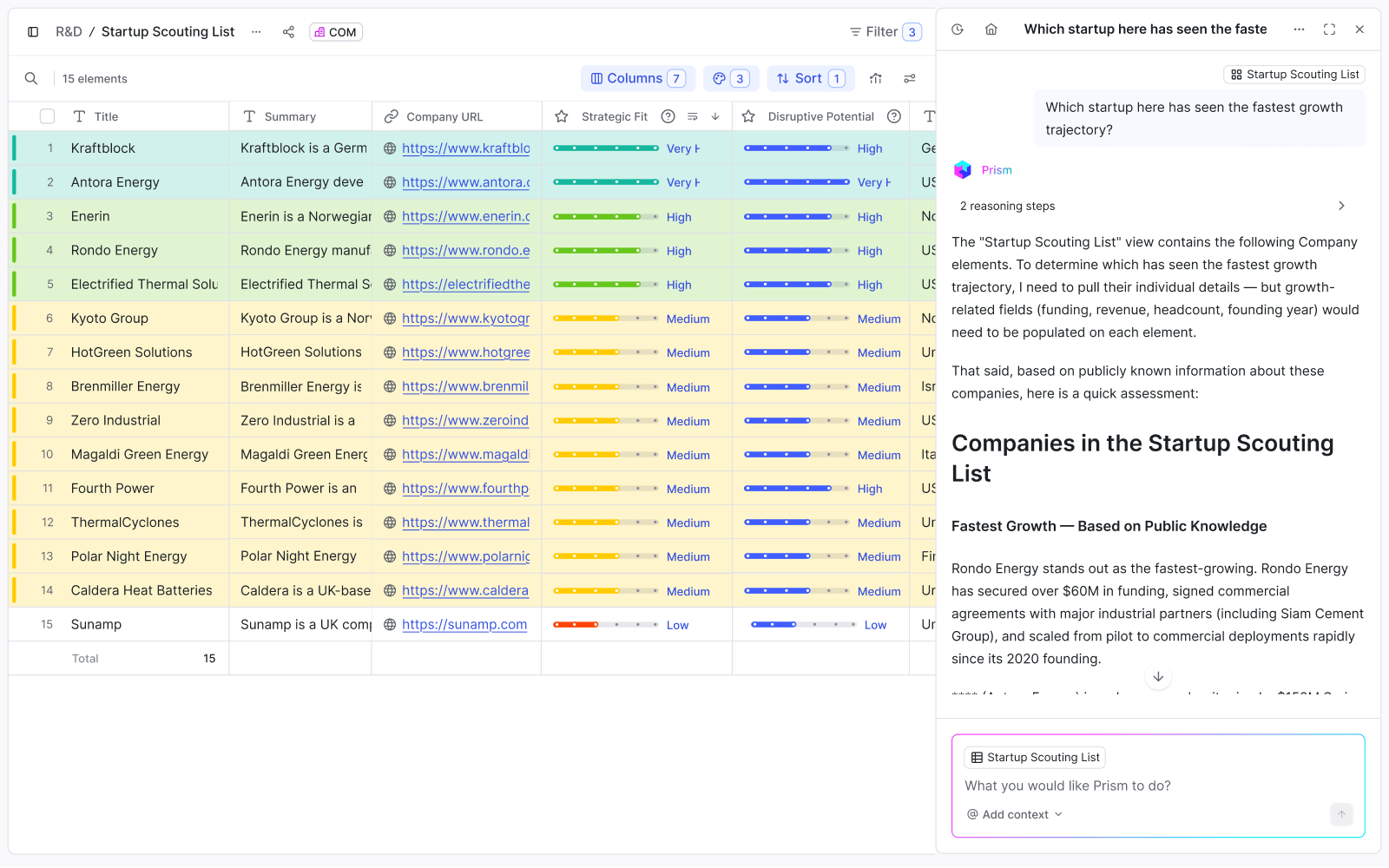
Exhibit 7: New technology discovery inside ITONICS
Among ITONICS customers, Toyota Motor Europe tested 40 innovation software systems before choosing ITONICS. More than 500 Toyota members across Europe now work on the platform, which manages over 200 R&D projects.