R&D software implementation: The guide to driving day-one adoption


R&D teams dare to test ideas fast and kill the bad ones early. Implementing supportive R&D software often fails before it starts. New software always first sounds like more effort, long before anyone sees less work due to digital transformation or the launch of groundbreaking products.
Plenty of businesses repeat the same mistakes with every new tool implementation. Successful R&D software deployments start long before access is granted. And, it doesn't stop at go-live. This guide walks through four phases that determine whether the rollout earns its place or fails.
| Phase | Biggest pitfall | What to do |
| 1. Business need plan | Skipped or rushed into the afternoon | Map decisions, workflows, stakeholders, and benchmarks before looking at software |
| 2. Evaluate and select | Vendor demos drive the decision | Test your own use cases live, check the roadmap, watch for feature-led pitches |
| 3. Rollout and go-live | Customizing instead of configuring | Pilot one use case with 10-15 users, stick to configuration, show evidence, not mandates |
| 4. Post-implementation | Team disbands at go-live | Track decision usage, set 30/90/12-month milestones, embed in existing reviews |
Exhibit 1: 4 phases of R&D software implementation
Good R&D software supports modern development processes and problem-solving for complex problems. The real benefit shows up once the platform replaces a workaround. Most problems start already before the software arrives.
R&D teams already run on something. A spreadsheet. A Monday status meeting. A doc someone updates when they remember. Not elegant, but it works, mostly, for the people doing the actual work.
Then someone above the team proposes a platform. Nobody asks the only question that matters: what does the spreadsheet actually fail to do?
The spreadsheet workflow is a prime example. Usually, nothing is wrong until ten projects become forty, until two reviewers become six, until someone asks about the competitive edge and innovation portfolio health. The spreadsheet rarely fails at the work itself. It fails at scale, it fails at staying ahead, or at a report the team never needed in the first place.
Buy software from a company without knowing the team's pain points, and you've added a new tool on top of a process that already ran fine, providing a service the team didn't want.
Standard training walks people through buttons and screens. It skips the one question that actually matters: what decision does this software help me make?
Give R&D teams the right tools and they adopt fast. Give them the wrong ones, and they route around them just as fast. R&D people aren't against change. Driving innovation and fighting technical uncertainty is their lifeblood.
But, they're against change that adds steps without removing any. Give a researcher a new tool that adds three clicks to a workflow that already works, and they'll keep the old workflow.
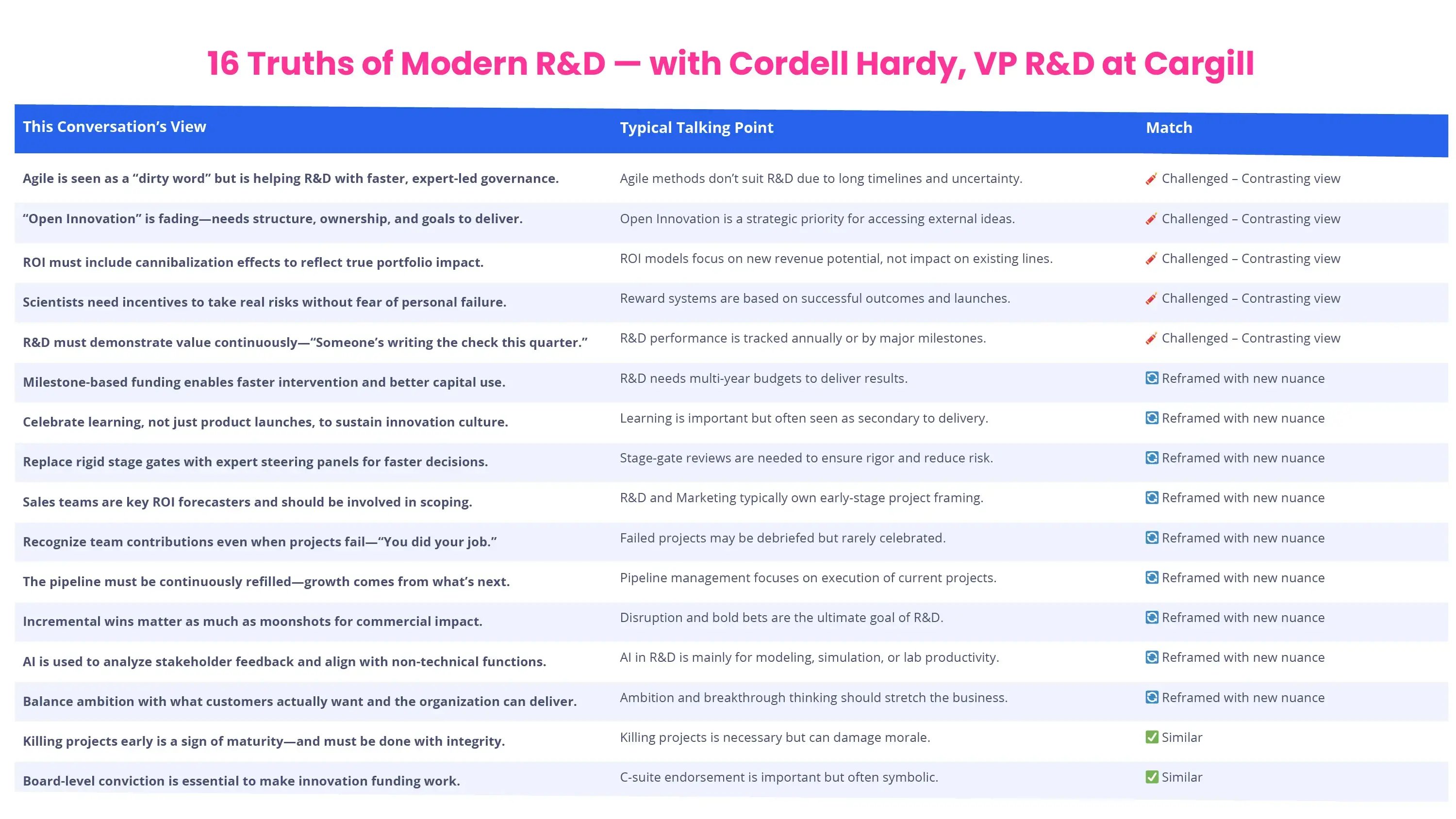
Exhibit 2: 16 truths of modern research and development
IT teams are good at two things: deploying fast and standardizing systems. Neither helps R&D software land well.
R&D work doesn't run in straight lines. A stage gate process in pharma development looks nothing like a scouting workflow in manufacturing. Generic configurations rarely enhance any workflow.
Most businesses still hand this to IT by default, because they provide the IT services and own the budget line. Hand R&D software to IT alone, and you get a tool built for a workflow that doesn't exist. The innovation software isn't bad. The configuration just never matched the work.
Talking about stakeholders, procurement can also be a hurdle. They favor whatever is already licensed, already vetted, and already cleared for security review. Easier to approve, cheaper to renew, zero new company risk.
R&D needs something that maps stage gates, scouts technologies, and tracks portfolio decisions. A generic project tool was never built for any of that, and none of it shows up on a procurement scorecard.
So the team gets handed whatever PPM tool finance already pays for. It half works. Everyone builds workarounds in week one, and those workarounds become the real system within a quarter, running quietly outside the platform procurement approval.
Standard software wins the approval process and loses the actual job. The fix is putting R&D's specific use cases in front of them and giving them what they look for: cost savings, a comparison list, and a business case.
/Still%20images/AI%20Mockups%202025/foresight-discover-new-insights-2025.webp?width=2160&height=1350&name=foresight-discover-new-insights-2025.webp)
Exhibit 3: ITONICS Prism scouts the environment for emerging technologies
Innovation and R&D software rollouts run in four phases: business need plan before you buy, evaluate and select, roll out and go live support, and embed after launch.
Most companies do phases 2 and 3 reasonably well. Plenty of businesses skip phase 1 and phase 4 because they don't show up on anyone's development timeline.
Some of what you need might already live in existing software your team just isn't using well. Developing this map takes some weeks. The output is a map:
Skip this, and vendors fill the gap with demo tools built to impress. You end up buying software that wins demos, not software that fits your research and development process.
Most rollout projects in research and development measure success at launch:
None of that tells you whether anyone is actually using it for real decisions three months later.
The number that matters: active usage by core R&D users at 30, 60, and 90 days. You can only track that if you outlined your business need plan in phase 1.
Phase 1 sets the criteria. Phase 2 picks software against those criteria. Phase 3 configures and deploys against the use cases from phase 1. Phase 4 measures against the benchmarks set before you bought anything.
Skip phase 1, and you restart the whole planning process at phase 3, when fixing it costs far more. Skip phase 1 and phase 2, and you have nothing to evaluate against. Rush phase 2 and phase 3, and you inherit software that can't deliver.
Each phase leans on the one before it.
Most companies budget a week for this and spend an afternoon instead, then wonder why adoption stalls six months later.
If you do it correctly, you will know exactly what solutions the platform needs to deliver, who needs to use it, and how you'll measure whether it worked, before any software scouting work even starts.
Start with decisions and pain points. List the five to ten calls and pain points your R&D team makes regularly: which projects get funded, which technologies get scouted, which initiatives get killed, and how resources get allocated across them.
For each one, note who decides, what information they need, and where that information lives today. The gaps, missing data, stale numbers, and manual spreadsheets are your use cases.
Don't start looking for features if the pain points are unknown.
| Technology Scouting | Project & Portfolio Management | Idea Management | Reporting, Decision Support & Integration |
| Slow, manual scouting: technology signals arrive too late to influence the roadmap | Resource conflicts surface only after commitments are made: projects stall mid-execution, deadlines slip | No owner for the review step: good ideas die in the queue before reaching a decision | Portfolio reports take days to compile across scattered tools: leadership decides on outdated snapshots |
| No tracking from scouted technology to funded project: scouting effort gets repeated, insights go nowhere | Stage-gate reviews run on stale data: wrong projects get funded, weak ones survive past their kill point | Idea approval disconnected from funding: approved ideas never get resourced, pipeline value is lost | Requested numbers don't exist in the current format: ad hoc fire-drill reporting replaces real visibility |
| Killed initiatives lose their rationale: the same failed idea gets re-proposed and re-funded later | New software adds reporting work without removing any: adoption stalls, teams revert to the old workaround |
Exhibit 4: Typical pain points in large R&D organizations
Software sits atop a workflow. It doesn't replace one. Walk through how projects move from idea to decision today. Where does it stall? What's still manual?
Look through the specific lenses of different teams. Hardware research and software development projects rarely look alike. This workflow map feeds the business need plan and becomes the configuration brief in phase 3.
The plan touches more people than the R&D team: portfolio managers, R&D leadership, IT, or procurement.
Understand what every group needs before any vendor demo. Show what problems the software should solve, what resources are needed, and how they'll judge success in the first 90 days.
Catch misalignment here, and it costs a few weeks. Catch it after go-live, and it costs the rollout's credibility.
Set the numbers before you pick software, not after, or you'll quietly redefine success as whatever the platform delivers.
Useful benchmarks: active users at 30, 60, and 90 days; portfolio decisions made in the platform during the first quarter; hours saved per researcher per week on manual reporting.
With your business need plan and stakeholder buy-in in hand, evaluation gets simple. You can now start searching for companies, software solutions, and innovative solutions.
Research and development teams typically operate on a global scale. Within your business need plan, you should have already mapped the user needs of the different teams.
Nonetheless, you should prioritize where to start to enhance your research and development activities.
Supporting global process and program visibility comes with other priorities than supporting local teams with scouting industry trends or market trends. Think already about your rollout strategy.
Do you want to start with a specific applied research team to create early value, or are you planning for a global rollout across hundreds of projects and resources?
Given the priorities, you can prioritize more easily what the solutions need to offer: accessibility, configurability, user experience, or artificial intelligence features.
Like you prioritized your pain points, you should also prioritize the solutions, functionality, and map to the benefits of resolving the pain points. What is a must-have and what is a nice-to-have?
Before joining a pitch or doing a risk analysis, note that vendor demonstrations show their best case. It is based on their data.
To get a more realistic picture of how easy implementation will be, bring your own scenarios instead. Pick the five hardest use cases from your business need plan and make vendors create and run them live.
Confirm the integration with your existing tools actually works live. A failed integration test here predicts the entire rollout.
| Technology Scouting | Project & Portfolio Management | Idea Management | Reporting, Decision Support & Integration |
| Search for a specific emerging technology domain, latest insights, and how they get logged into a tracked watchlist | Move a project through a stage-gate with a real approval workflow | Submit an idea, route it through a review committee, and convert it into a funded project | Pull a portfolio decision report filtered by business unit, not a generic global dashboard |
| Filter scouted technologies by maturity stage and a holistic tracking mechanism for portfolio reviews | Reallocate resources across two active projects and show the impact on both timelines | Archive a killed initiative with its rationale attached, not just deleted | Show how a stale or overdue project gets flagged automatically, not manually chased |
| Show how R&D and finance see different views of the same project without duplicate data entry | Connect to one existing tool live, such as a spreadsheet export or project tracker, and import real data |
Exhibit 5: Typical scenarios to test in research and development software pitches
Three signs the evaluation is heading the wrong way:
Any of those means the platform creates a parallel system people quietly route around.
You should also consider the feature when evaluating software companies. They should invest in further software development, machine learning, and new features, and not only drive operational efficiency.
A platform frozen at the feature set you bought becomes dead weight in two years. Research and development are driven by constant change, so should be your innovation infrastructure.
Vendors who keep developing keep up. Vendors who don't will leave you migrating again sooner than you'd like.
Most implementation guides start here. For R&D software, this is where phases 1 and 2 pay off or get exposed.
The most secure process is to take the use case with the highest value and lowest configuration complexity from your business need plan. Test it with a pilot group of ten to fifteen people.
A tight pilot creates early adopters who can talk to skeptical colleagues credibly, and surfaces configuration problems while they're still cheap to fix. Only expand once the pilot group can say why it's worth it.
This comes with longer integration timelines, but the value for research and technology teams is substantial.
Configuration is essential to adjust your processes, language, and agile methodologies to what the solution provider built as blueprints. In contrast, customization and bespoke software development add cost, stretch timelines, and leave technical uncertainty that complicates every future development cycle.
The best providers have customer success teams or advanced algorithms helping you to configure the system to your needs. If you look for an essential decision-making criterion, configurability beats any bespoke software development activities.
/Still%20images/Radar%20Mockups%202025/capability-views-ease-multi-criteria-decisions-2025.webp?width=2160&height=1350&name=capability-views-ease-multi-criteria-decisions-2025.webp)
Exhibit 6: A trend radar, highlighting the impact of the trend convergence of AI
R&D people have massive existing knowledge and daily acquire new knowledge. Winning their trust requires evidence. Don't tell a researcher to use new software because leadership said so. You need concrete examples, reasonable arguments, and data to launch an innovative product.
Show, don't tell.
Build training around the five decisions from phase 1 and use different training formats. Show and document exactly how the software supports each one and what data feeds it.
Invite for a first 45-minute session to streamline operations and outline the implementation project. Use the five decisions from phase 1 and show the benefits for the research and technology team.
Schedule follow-up sessions with smaller teams to discuss specific tool processes and questions. Efficiency comes from solving concrete questions and not from an overloaded, extensive experience or treating everyone the same way.
Phase 4 turns the implementation project from initial usage into a habit. This is the performance-driving phase.
Most companies declare victory at go-live and pull the implementation team off the project. That's exactly where the return on the investment gets built, or lost.
Track three things: login frequency, feature usage, and decision usage. Decision usage is the only number that proves the rollout paid off; logins just tell you people are showing up. Schedule feedback sessions, run interviews, or use the tool in recurrent sessions to increase performance.
Check all three monthly for six months. Low decision usage at month three means a configuration and process routine problem. The fix is not another training session, but that your research processes are not well-covered.
Set milestones at 30 days, 90 days, and 12 months, tied to the benchmarks from phase 1.
A platform earns its place when it becomes part of rituals that already happen: quarterly reviews, experimental development meetings, and technology steering calls.
Make the platform the source of knowledge in those meetings. If the data isn't coming from the software, it becomes irrelevant within two quarters, and re-adoption is harder than the first rollout.
No configuration survives contact with real users unchanged. Expect two or three rounds of adjustment in the first six months. That's normal, not a sign that something went wrong.
Create a monthly feedback channel where users flag what isn't working. Sort it into quick configuration fixes versus real capability gaps that need a roadmap change.
ITONICS is strategic portfolio intelligence for R&D, strategy, and innovation teams supporting research projects, knowledge sharing, and intellectual property development.
/Still%20images/Roadmap%20Mockups%202025/portfolio-visualize-critical-paths-2025.webp?width=2160&height=1350&name=portfolio-visualize-critical-paths-2025.webp)
Exhibit: Roadmap with projects and milestones showing schedule conflicts
ITONICS modules enhance core review routines once embedded properly. The platform works the same way for a 20-person R&D team in one technology sector and a global business running a dozen sites across several technology areas. The benefit compounds the more teams use it and create a structured path to technological advancements and innovation.
Our customer success team pairs software training with implementation services at each phase, mapping decision use cases and customer needs before deployment, bringing reference companies from manufacturing, pharma, and tech for evaluation, deploying through configured modules like trend radar for surfacing new opportunities and project portfolio management, and tracking adoption through customer success checkpoints at 30, 90, and 180 days.