
A workspace is an area inside an organization with its own element types, elements, folders, and views. Each workspace has its own users, roles, and access setting, so different teams can work on different content in one organization.
What belongs to a workspace
- Element types and their properties, which set the structure of the content. See Understanding element types.
- Elements, the content itself.
- Folders and views, which make up the workspace navigation.
- Users and their workspace roles, which decide what each person can do in the workspace.
Every workspace has the same tools. What differs between workspaces is their content, configuration, and users. Content and settings stay in their workspace, so changes you make to one workspace's element types don't affect other workspaces.
Public and private workspaces
Each workspace has an access setting that decides who can open it.
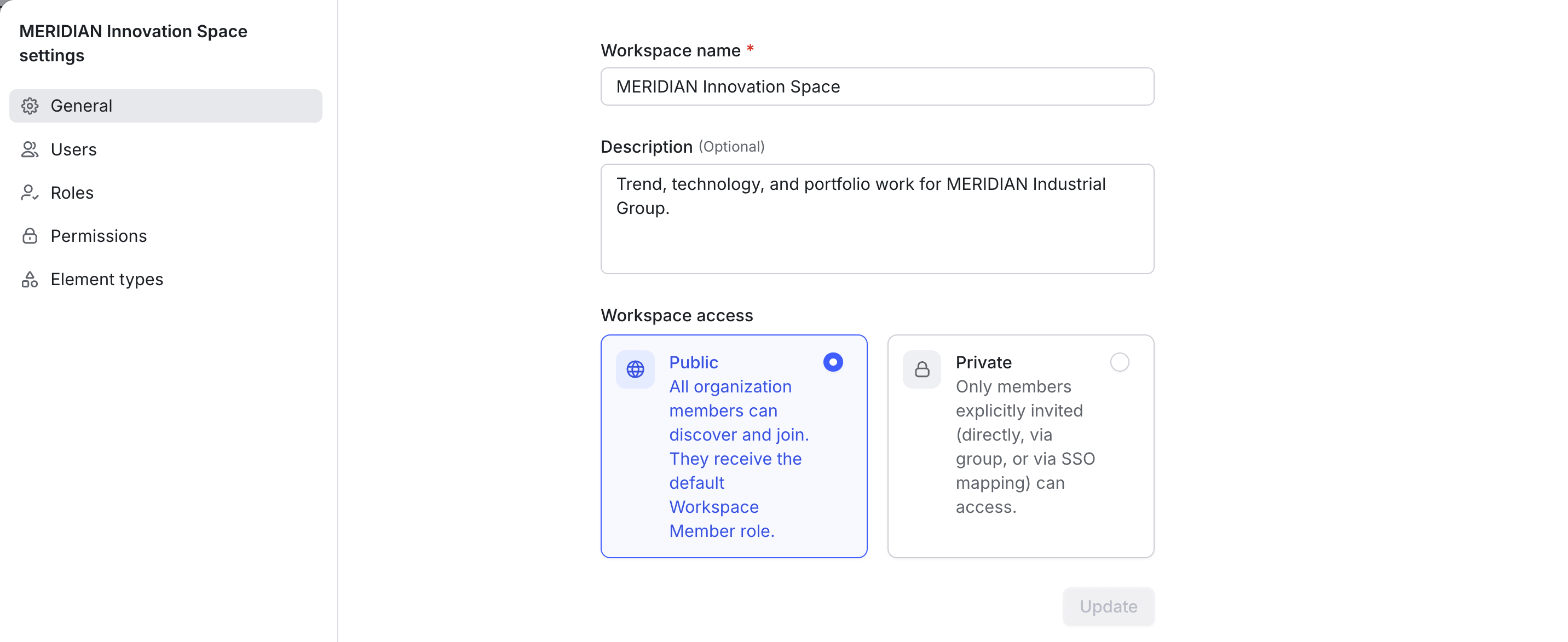
| Access | Who can open the workspace |
|---|---|
| Public | All members of the organization can find and join the workspace. They get the workspace's default role. |
| Private | Only people added to the workspace, including people added through SSO mapping. |
To change the setting, see Define workspace access: public vs. private.
Working across workspaces
If you have access to several workspaces, you move between them from the workspace menu. See Switch workspaces.
To reuse elements from another workspace instead of creating them again, see Copy elements to another workspace.
Workspace settings
Each workspace has its own Workspace settings. By default, Workspace Admins can open them for their workspace, and Application Admins can open them for every workspace from the organization settings. See Manage all workspaces.
| Page | What you manage there |
|---|---|
| General | The workspace name, description, and access setting. See Manage workspaces. |
| Users | Who is in the workspace and which role each person has. See Manage workspace users. |
| Roles | The roles available in the workspace and the default role for new users. See Manage workspace roles. |
| Permissions | What each role is allowed to do. See Manage workspace permissions. |
| Element types | The element types the workspace uses. See Manage element types in a workspace. |
To create a new workspace, see Create a workspace.